
The calendar style date picker has become ubiquitous as a date input control, but it’s not always the best choice.
When should I use a date picker?
Date pickers work best when the user isn’t sure which date they want to enter.
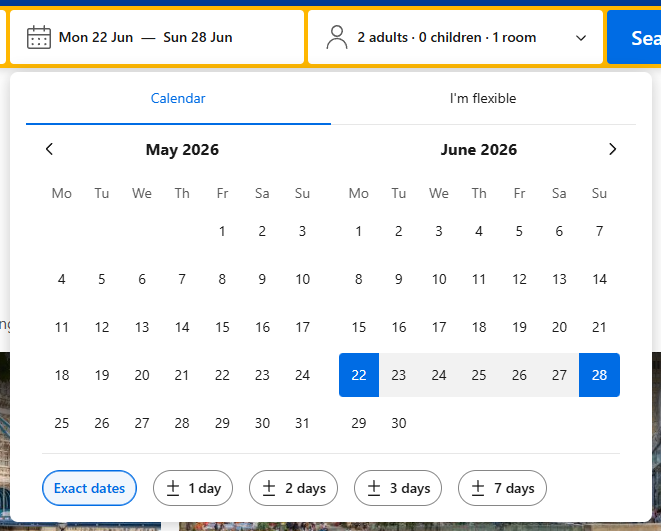
Consider the scenario of someone booking a hotel; they may remember that their holiday is the last week of June, but may not remember the precise day numbers. The date picker, by presenting a calendar, combines two tasks: looking up day numbers, and selecting a precise date.
When shouldn’t I use a date picker?
When the user is already sure of the date.
The best example of this is date of birth, but other examples include wedding dates, employment start dates, and insurance renewal dates.
The use of a date picker for date of birth is particularly egregious, as the date picker will often default to the current day, requiring potentially dozens of clicks by the user to navigate to the correct year.
This issue is then compounded by the enormous variety of date picker designs, not all of which share the same features.
What should I use instead?
My preferred date input control, for memorised dates, looks like this:

A two character input for day, a dropdown for month, and a four character input for year.
The length of the text inputs (even without the placeholder text) shows the user that day comes first. And the dropdown for month avoids the awkwardness of “am I supposed to be typing a month name, or a number?”, which can be an issue in single text input designs.
There’s a variation of this design with dropdowns for day and year as well, but it’s much slower to use as it requires clicking, pointing, and potentially scrolling, for all 3 elements of the date.
Additional masking can be applied to day and year to restrict input to numbers only, but of course the final combination of elements must still be validated.1
I like that this design balances speed of input (through the use of the keyboard for day and year) with correctness of input (through the dropdown for month, and the character length limits on day and year).
-
This validation may be part of the reason that developers will instinctively reach for a date picker. Date pickers are usually designed such that the user can only select valid dates, and no further client-side validation is required. ↩

How to use scroll position in CSS